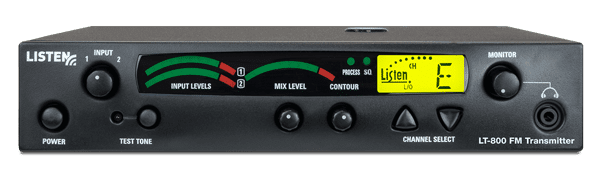
Stationary FM Transmitter
LT-800

Highlights

  • Superior Audio Quality
  • Long transmission range
  • Designed for installation
  • Advanced audio processing
  • Limited Lifetime Warranty


Overview

Thanks to its outstanding audio quality, the Listen LT-800 Stationary Transmitter can be used in a variety of applications. The LT-800 is connected to your main audio system, broadcasting a high quality audio signal to belt pack receivers, stationary receivers, or wireless speaker / receivers. The end result – your audience can hear and understand the presentation better because of improved speaker placement or because they have their own belt pack and headset. The signature Look & Listen™ LCD shows channel, lock, programming and RF power.


Includes

  • LT-800 Stationary Transmitter
  • LA-207 12 VDC Replacement Power Supply for LT-800
  • Quick reference card


Configurations

LT-800-072-01 North America
LT-800-072-02 Asia, UK
LT-800-072-03 Euro
LT-800-216-01 North America
LT-800-216-02 Asia, UK
LT-800-216-03 Euro

Architectural Specs

The stationary FM transmitter shall be capable of broadcasting on 57 channels. The transmitter shall have a SNR of 80 dB or greater. The output power shall be adjustable to quarter, half or full. Channel tuning shall be capable of being locked. The device shall broadcast on both wide and narrow band channels. The device shall have an audio frequency response of 50 Hz to 15k Hz, ± 3 dB at 72 MHz, or of 50 Hz to 10k Hz, ± 3 dB at 216 MHz. It shall have two mixing audio inputs. The device shall have the following audio controls: input level, mix level and an adjustable low pass filter. The device shall have an audio processor that is capable of automatic gain control and limiting. The Listen LT-800 is specified.


CAD Drawing

  • Line Drawing

    Stationary FM Transmitter

    1.   POWER on/off on front of unit for easy access.
    2.   Multiple audio inputs, with input level control and dual VU meters.
    3.   Mix level control sets level of mixed audio. VU meter shows the output level of your mixed audio.
    4.   Contour equalization cuts/boosts frequencies above 5 kHz.
    5.   Processing (automatic gain control and compression) can be turned on and off from the front panel.
    6.   SQ (Super Quiet Companding Technology) can be turned on and off from the front panel.
    7.   LCD display shows channel selected, channel lockout, programming and RF power.
    8.   Top mount antenna jack for top mounted telescoping antennas.
    9.   Earphone jack and volume control to check audio integrity of transmission source.
    10. UP/DOWN channel selection of 57 channels. User can easily change between Basic and Expanded modes. 11. The test tone level is adjustable, which adds flexibility when setting up and testing your system.
    12. Rear mount and remote antenna BNC connector.
    13. Multiple transmitter power settings (full, ½ and ¼) with indication on LCD display.
    14. In-line power supply (included) attaches here.
    15. Two (2) phono connectors for a mixed output of Inputs 1 and 2.
    16. Two (2) unbalanced phono audio inputs. Select either +10 dBu or -10 dBu.
    17. Balanced XLR / ¼ inch audio input. Select either mic, line or mic phantom power level for input. Electret (Condenser) microphones can now be used with Input 1 phantom power.
     

    Specifications

     SpecificationsLT-800-072      LT-800-216
    RFRF Frequency Range 72.025 - 75.950 MHz   216.0125 - 216.9875 MHz
    Number of Channels17 wide band, 40 narrow band   19 wide band, 38 narrow band
    Number of Simultaneous Transmitters63
    Frequency Accuracy± .005% stability +32º to +122 ºF (0º to +50 ºC)
    Transmitter Stability50 PPM
    Transmission Range Up to 1,500 ft. (457 m) Up to 3,000 ft. (914 m)
    Output Power 80,000 uV at 3 m  100 mW (max allowed by FCC)
    AntennaVarious antennas available
    Antenna ConnectorBNC
    ComplianceFCC Part 15, Part 90, Industry Canada
        
    Audio** All system specifications are wireless end to end**
    System Frequency Response50 Hz - 15 kHz (±3 dB)50 Hz - 10 kHz (±3 dB)
    System Signal-to-Noise Ratio (A-Weighted)SQ enabled 80 dB, SQ disabled 60 dBSQ enabled 80 dB, SQ disabled 50 dB
    System Distortion<2% total harmonic distortion (THD) at 80% deviation
    Audio Input 1Rear panel, one (1) Female XLR or 1/4 in combo connector, balanced, 0 / -55 dBu (line/mic) nominal input level adjustable, -30 / +21 dBu (line/mic) maximum input level, impedance 20k / 1k ohm (line/mic), phantom power +12 VDC
    Audio Input 2Rear panel, two (2) phono connectors, unbalanced, -10 / +10 dBu nominal input level adjustable, +30 dBu maximum, impedance 100k ohm
    Audio Processing (Process)Compression can be turned on/off, slope internally adjustable from 1:1 to 4:1, default 2:1
    ContourCuts and boosts frequencies above 5 kHz
    Combined Audio Output (Mix)Input 1 and input 2, mixed output (rear panel), two (2) phono connectors, unbalanced, -10 dBu nominal output level, +15 dBu maximum, impedance 10 ohm
    Headphone Output (Monitor)Front panel, one (1) 3.5 mm (0.14 in.) stereo connector, unbalanced, adjustable output level, +3 dBu maximum, impedance 10 ohm
     
    ControlsFront PanelPower, test tone on/off, channel up/down, input levels, mix level, contour, monitor volume control
    Rear PanelInput 1 Level, (Line, Mic, Mic-Phantom Power), Input 2 level (-10 / +10 dBu), RF power level (low, mid, high)
    Internal AdjustmentsCompression ratio for audio processor
    ProgrammingSQ on/off, process on/off, channel lock
        
    IndicatorsInput1, Input 2, Mix Level VUIndicates Input 1, Input 2, and Mix audio levels; 10 segment LED's (8 green, 2 red)
    SQ and ProcessingIndicated by a green LED when on (front panel)
    RF PowerIndicated on the LCD (low, mid, high)
    LCD DisplayChannel designation, lock status, RF power level, programming (front panel)
    Test ToneRed LED illuminates when test tone is enabled.
        
    PowerPower SupplyIn line power supply, Listen part number LA-207 (Line cord is determined by the each Country's AC power standards)
    Power Supply InputInput: 100-240 VAC, 50-60 Hz, 0.4 A
    Power Supply OutputOutput: 12 VDC, 1.3 A, 15.6 W
    Power Supply ConnectorOutput Connector: 0.02 in (5.0 mm) OD, 0.01 in. (2.5 mm) ID, barrel type
    Power Supply ComplianceUL, CE, GS, TÜV, RoHS
        
    PhysicalDimensions (H x W x D)1.75 x 8.50 x 9.13 in. (4.5 x 21.5 x 23 cm)
    ColorDark Grey with white silk screening
    Unit Weight2.6 lbs. (1.2 kg)
    Unit Weight with LA-207 Power Supply3.5 lbs. (1.6 kg)
    Shipping Weight6 lbs. (2.7 kg)
    Rack MountingOne (1) rack space height, 1/2 rack space wide. One (1) or two (2) transmitters can be mounted in one rack space, optional rack mount (LA-326)
    ComplianceRoHS
        
    EnvironmentalTemperature - Operation -10 ºC (14 ºF) to +40 ºC (104 ºF)
    Temperature - Storage -20 ºC (-4 ºF) to +50 ºC (122 ºF)
    Humidity0 to 95% relative humidity, non condensing
        
    Specifications are subject to change without notification

    Requirements

    Used With

    Accessories

    FAQ

    Does the LT-800 include the rack mount?
    No, but an LA-326 Universal Rack Mounting Kit is available for purchase.

    Do I need a transmitter for each audio source?
    Yes.

    What is the range of the LT-800 transmitter?
    Line of site up to 1500 ft. (457 m) for 72 MHz.
    Line of site up to 3,000 ft. (914 m) for 216 MHz

    Is there a limit to the number of transmitters I can use in one room?
    Yes. The 72 MHz LT-800 has a maximum of six. The 216 MHz LT-800 has a maximum of three. The 863 MHz LT-800 has a maximum of eight.

    How many receivers can I have on a system?
    As many as you want. The transmitter simply transmits a signal and you can have as many receivers pick that signal up as necessary. It’s like a radio station transmitting and the receivers are the radios tuning into the “channel.”


    Troubleshooting Guide

    What is the range of this transmitter?

    • Depends on the following:
      • The frequency of the transmitter.
      • The transmitter's location.
      • The antenna being used on the transmitter and receiver.
      • The location of the remote antenna (if applicable). In general, the higher the antenna the more range.
      • The length of coaxial cable ran to the antenna from the transmitter (if applicable). Every foot of cable creates a power loss.
      • The RF power setting on the transmitter.
      • The objects between the transmitter and receiver. All material, especially metal, will weaken the signal strength.
    • When using 72 MHz, a direct line of sight distance of 1500 feet from the transmitter can be achieved.
    • When using 216 MHz, a direct line of sight distance of 3000 feet from the transmitter can be achieved.

    What channels should I be transmitting on?

    • It is recommended that wideband channels are used for best audio quality. If transmitting multiple simultaneous channels, narrowband frequencies may be required.

    How many transmitters can I have operating simultaneously?

    • 72 MHz: 6 simultaneous transmissions
    • 216 MHz: 3 simultaneous transmissions

    The signal being transmitted is inconsistent, my receiver cuts in and out.

    • The receiver may be out of range of the transmitter.

    What type of microphones can I use with this transmitter?

    • Dynamic microphones can be used when the Input 1 level select switch is in the "MIC" position.
    • Condenser microphones can be used when the Input 1 level select switch is in the "MIC + Phantom Power" position.

    I can't change the channel on my transmitter.

    • The unit is locked on a channel. To unlock, hold the channel select "Up" for 3 seconds. The padlock icon will extinguish from the LCD display.

    I can't access the narrowband channels on my transmitter.

    • The transmitter is in "Basic mode" and all narrowband channels are locked out. To enter "Expanded mode" and transmit on a narrowband channel, hold the channel select "Down" button while turning on the unit.

    What does the "contour" knob do?

    • The contour knob boosts or cuts frequencies above 5kHz. It is recommended that this knob be turned counterclockwise for voice and clockwise for music.

    What does the "process" feature do? When should I use it?

    • The process feature is a type of Automatic Gain Control. If your input signals to the transmitter are inconsistent in level and you wish to have gain control, then this should be turned on.

    Where should I have the input level switches positioned on the back of my transmitter?

    • Depends on the level of audio being input.
    • When using Input 1:
      • MIC position: For a microphone or MIC level input of -55dbu.
      • MIC Phantom Power: For a condenser microphone that needs a 12VDC phantom power supply supply at a -55dbu level input.
    • When using Input 2:
      • +10dbu/SPKR position: When connecting a speaker or any other higher line level audio input.
      • -10dbu/Line position: When connecting a regular line level input of -10dbu.

    My transmitter seems to have lost power/range.

    • Make sure that the antenna is connected properly.
    • Make sure that the RF power switch is in the correct position.
    • A more efficient transmit antenna may be needed.

    Can this transmitter be powered with a DC voltage?

    • NO. The transmitter must use the supplied 15VAC power supply.

    Can I use this transmitter with other manufacturer's receivers?

    • YES. Please refer to the frequency compatibility charts in the manual or on the website for channel conversions. When using other manufacturers products, SQ (Super Quiet) must be turned OFF.